Add Rewardful to your website
The final step is to add Rewardful to your website so that we can track visits, leads, and conversions.
These instructions have been prepared for The Copy Haus .
Instructions for Checkout Page
Choose a different setup method
To ensure affiliate links track properly between your website and your Checkout Page, you'll need to install Rewardful on both.
1. Add Rewardful to Checkout Page
- Sign in to your Checkout Page dashboard
- Open your selected checkout, and navigate to Settings → Tracking pixels.
-
Copy and paste the Rewardful code snippet below
Copy<script>(function(w,r){w._rwq=r;w[r]=w[r]||function(){(w[r].q=w[r].q||[]).push(arguments)}})(window,'rewardful');</script> <script async src="https://r.wdfl.co/rw.js" data-rewardful="f504d0"></script>Note: If you're using a platform that has an official integration with Rewardful, simply copy & paste your Rewardful API key:f504d0. - Add the code to the textarea provided, and click the Save button.
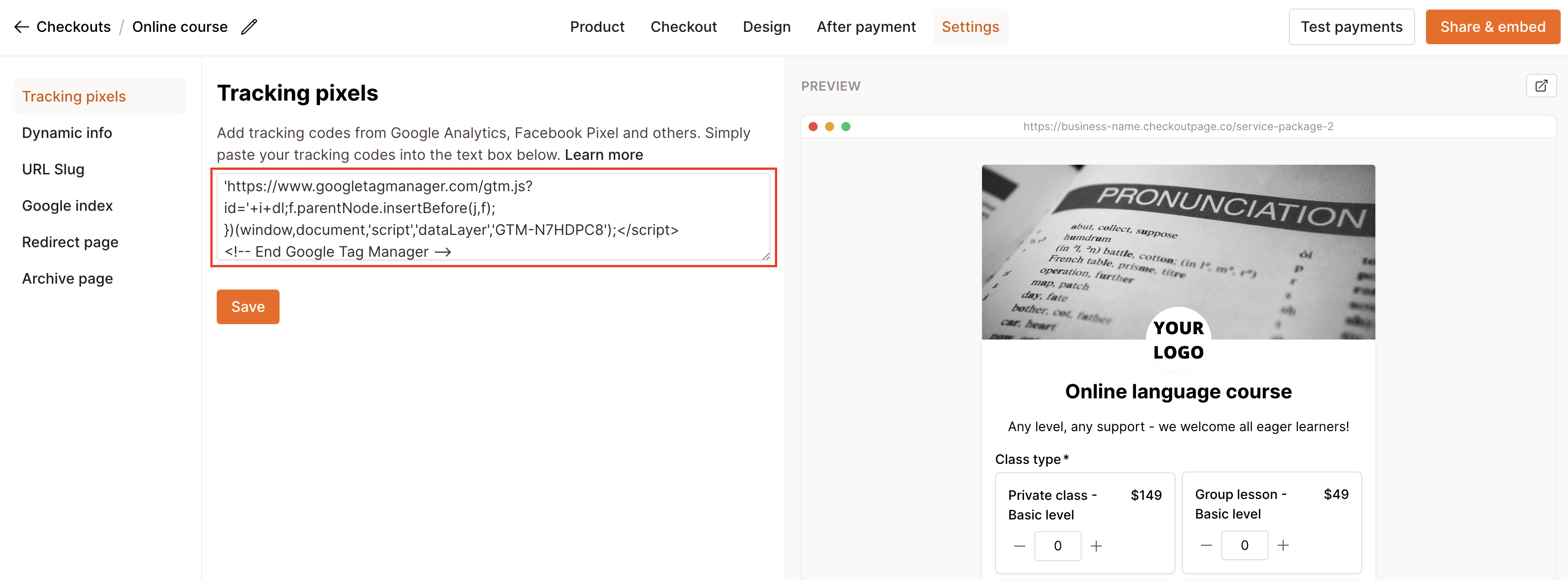
With this completed, affiliates will be able to send new visitors customers
directly to your hosted Checkout Page.
2. Add Rewardful to the rest of your website
To allow affiliates to send traffic to your homepage and other landing pages on your website,
copy and paste the Rewardful code snippet below into the
<head> tag of every
page of your website. It includes the data-domains attribute required to perform
cross-domain tracking.
<script>(function(w,r){w._rwq=r;w[r]=w[r]||function(){(w[r].q=w[r].q||[]).push(arguments)}})(window,'rewardful');</script>
<script async src="https://r.wdfl.co/rw.js" data-rewardful="f504d0" data-domains="checkoutpage.com, thecopyhaus.com"></script>
Note:
If you're using a platform that has an official integration with Rewardful, simply copy & paste your Rewardful API key:
f504d0.
Your website and Checkout Page use different domains, but web browsers can't track cookies
across different domains. The
data-domains attribute allows Rewardful to ensure
that visitors who arrive on your website will be properly attributed to the affiliate when
they click through to your Checkout Page.
3. Double-check that the values listed in data-domains are correct!
It should be a comma-separated list of all the domains your websites use, as well as
checkoutpage.com.